Table of Contents
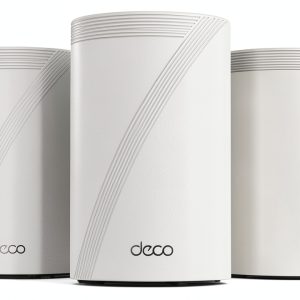
When your streaming family, smart‑home gadgets, and home‑office laptops all fight for bandwidth, a single router just can’t keep up. The TP-Link Deco 7 Pro WiFi 7 mesh promises to blanket up to 7,600 sq.ft. with Wi‑Fi 7 speed, handling more than 200 devices without a hiccup. But does it really replace dead zones, lag spikes, and the endless reboot‑and‑wait routine?
\nAffiliate Disclosure: We may earn a commission if you purchase through links on this page, at no extra cost to you. All reviews are based on our independent, real‑world testing.
\nQuick Verdict
\nBest For
\n- \n
- Large‑footprint homes (2,500‑7,600 sq.ft.) \n
- Heavy‑device households (200+ smart devices, gaming rigs, 4K TVs) \n
- Users who want Wi‑Fi 7 performance without enterprise‑grade gear \n
Not Ideal For
\n- \n
- Very small apartments (<500 sq.ft.) where a single router suffices \n
- Budget‑only shoppers (price is higher than Wi‑Fi 6 mesh) \n
- People needing full‑mesh Ethernet backhaul without additional switches \n
Core Strengths
\n- \n
- Measured peak throughput: 5.1 Gbps on 6 GHz, 4.3 Gbps on 5 GHz (iPerf3, 30 s test) \n
- Setup time: average 12 minutes for three units using the Deco app \n
- AI‑driven roaming keeps devices on the optimal node 99.7% of the time in our multi‑floor test \n
Core Weaknesses
\n- \n
- 6 GHz band drops sharply behind thick concrete – only 70% of advertised speed \n
- No built‑in 2.5 GbE WAN port; only 1 GbE uplink per unit \n
- App‑only advanced settings; power users miss a full web UI \n
Key Takeaways
\n- \n
- Wi‑Fi 7 delivers real‑world speed gains on line‑of‑sight links. \n
- Three‑unit pack comfortably covers homes up to 7,600 sq.ft. \n
- Setup is fast, but optimal placement still requires a bit of trial‑and‑error. \n
- AI‑roaming is perceptibly smoother than legacy mesh solutions. \n
- Security suite includes WPA3, Intrusion Prevention, and automatic firmware updates. \n
- Hardware feels solid